As of January 2026, we’re pausing our use of Eventbrite for handling registration and payment processing for our trainings and switching to Zeffy. We began using Eventbrite several years ago as a simple solution for course and Mini-workshop registrations made using a credit card. Over the years, Eventbrite’s functionality has changed, and so with the transition to a new year, we’re giving a new platform a shot!
This blog post is intended to walk you through the new registration interface in Zeffy, including a couple of nuances that make it slightly different from Eventbrite. If you have any questions about Zeffy, or you’re having any difficulty registering for a course or Mini-workshop, please contact training@cscce.org. We will continue offering registration via invoice if that works best for your organization.
Please note: This post is not an endorsement of Zeffy, nor is meant to deter you from using Eventbrite for your ticketing or fundraising needs.
What is Zeffy, and how is CSCCE using it
Zeffy is an online fundraising platform designed for nonprofits, with 100% of ticket sales going directly to CSCCE. You can use Zeffy to collect donations, run fundraising campaigns, and manage member data. Currently, we’re testing out using Zeffy as a ticketing platform to manage Mini-workshop and course registrations and credit card transactions.
Registering for a course or Mini-workshop
Registering for a CSCCE training via Zeffy will probably feel pretty similar to using Eventbrite, if you’ve joined us for a course or Mini-workshop before. But, there are a few things about the interface that are slightly different.
To register for a CSCCE training, you can either use the embedded sales widget on the CSCCE website (you’ll find this by scrolling down the page to the “upcoming session” section on a course webpage), or click through to Zeffy:
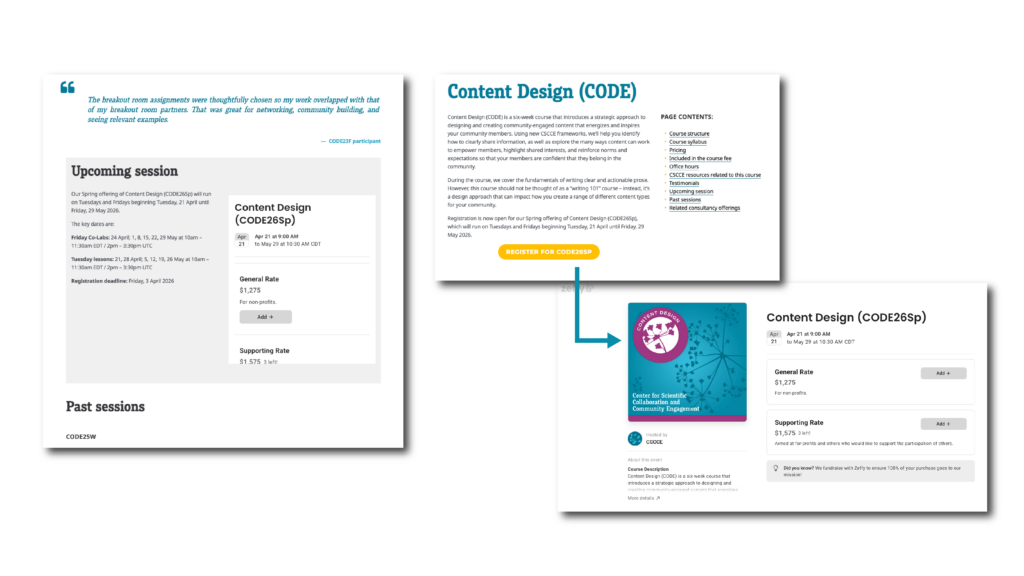
In either case, you’ll choose the ticket of your choice (we usually offer a standard, non-profit rate ticket and a supporting rate ticket for individuals from for-profit organizations or who would like to contribute to our accessibility fund), and click “Add”.
You’ll then be prompted to provide a Google-associated email address before you can purchase a ticket. You will need a Google-associated email address to access training materials in Google Drive, as well as to sign in to the CSCCE Canvas instance. If you do not have one, you can create a Google Account using any email address or create a new Gmail address.
Then, click “continue” to proceed to payment
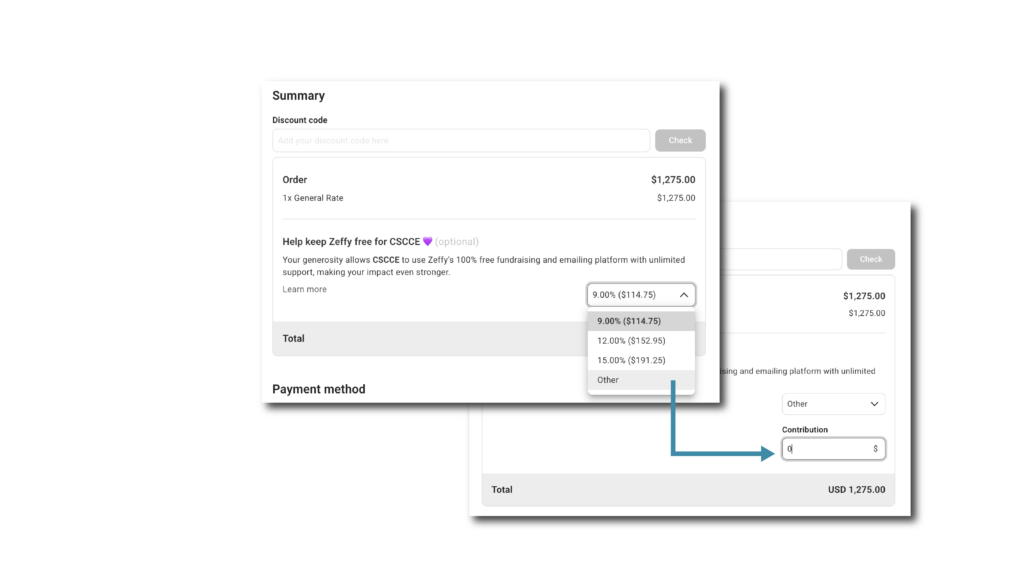
IMPORTANT TIP: On the payment page, Zeffy automatically suggests that you add a 9% donation to support its operations. This is how Zeffy is able to provide its platform without extra cost to us.
You can choose to change this to 0 by clicking “Other” and putting a “0,” but please note that unless you actively change this, Zeffy will add a fee to your purchase. Perhaps most importantly, we (CSCCE) are unable to refund this fee if you pay it by accident as it goes immediately and directly to Zeffy.
And that’s it!
Let us know how it goes!
We’ll be trialling Zeffy for Q1 and Q2 – and during this trial period we’d love to hear your feedback, both positive and negative. If you’re interested in using Zeffy yourself, we’d be happy to chat. Send us an email any time: info@cscce.org.